
Best copiers for small business
Start with what the office prints and scans. The Brother MFC-L2820DW covers basic black-and-white work. The MFC-L5915DW adds two-sided batch scanning, the Canon MF753Cdw II adds color output, and the Sharp MX-M3571 handles 11 × 17 originals.
Four copiers for four office workloads
Speeds are manufacturer ratings for letter paper. Each U.S. price links to a dated seller listing. Check the seller for availability, delivery, tax and service.
Black-and-white printing on a budget
Brother MFC-L2820DW
- Print output
- 34 ppm mono, up to legal
- Document feeder
- 50 sheets, one-sided
A good fit for receipts, invoices and ordinary office copies if most originals are one-sided. Automatic duplex printing saves paper. To scan both sides of a packet, staff have to turn it over and put the pages back in order.
$279.99 for a new machine. Checked at Brother US.
Black-and-white printing with frequent batch scans
Brother MFC-L5915DW
- Print output
- 50 ppm mono, up to legal
- Document feeder
- 70 sheets, scans both sides
Choose this if staff digitize two-sided contracts or forms every week. It scans in color even though it prints in black and white. Confirm the scan destination and include both the replacement toner and drum in your budget.
$589.99 for a new machine. Checked at Brother US.
Color proposals and client handouts
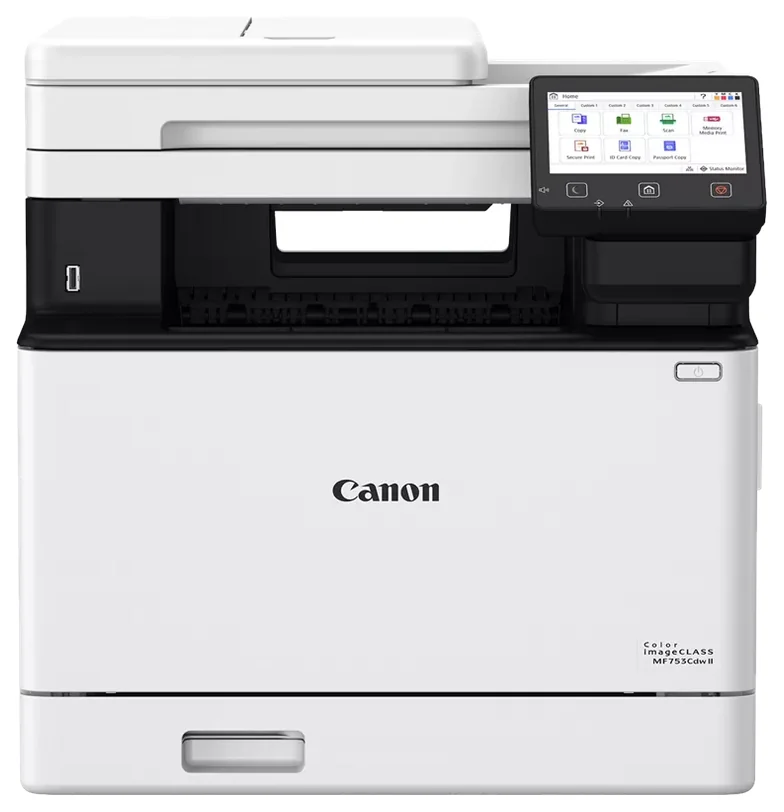
Canon imageCLASS MF753Cdw II
- Print output
- 35 ppm mono or color, up to legal
- Document feeder
- 50 sheets, single-pass duplex
Choose this if staff routinely print color and need a compact machine with two-sided scanning. Price a full toner set, including all three color cartridges, and check the workspace has clearance to open the trays and scanner.
$449.99 for a new MF753Cdw II (7185C011) at the advertised price. Checked at CDW.
11 × 17 drawings, schedules and larger packets
Sharp MX-M3571
- Print output
- 35 ppm mono on letter, prints up to 12 × 18
- Document feeder
- 150 sheets, single-pass duplex
This refurbished floor-standing option can scan 11 × 17 originals and copy them in black and white. Ask for its meter reading and service history. Have the dealer list the installed trays, cover freight and stairs, and confirm service for your ZIP code.
$4,300.00 for a refurbished MX-M3571 with two drawers and a stand. Checked at ABD Office Solutions.
What to try before you buy
- Count printed pages. Use a normal month from the current printer’s meter or service bill. Split color and black-and-white counts. Use that mix and a price for replacement supplies to compare three-year costs.
- Try a real scan batch. Feed 20 two-sided sheets and check that the PDF contains 40 images in order with blank-page removal off. Open the file as a regular staff member at the intended destination. For searchable PDFs, try finding a phrase from the last page.
- Bring the largest and heaviest paper you use. Show the dealer a sample of letterhead, legal forms or 11 × 17 drawings. Check which tray can feed it and whether that size can print or scan on both sides.
- Get service terms in writing. For a dealer-supplied machine, get the installed options, meter count if used, coverage at your ZIP code, response time and consumable exclusions. Compare delivery, setup and service over the same number of months.
Download a two-sided scan test packet to check page order and searchable text without sharing real paperwork.
If the job ends in SharePoint, a network folder or an invoice workflow, test the full scan route. For teams that need to extract fields from PDFs and route them into another system, see Paige from Ademero, the company that publishes CopierGuide.
Read published copier reviews and test reports for examples of issues you can reproduce in a demo.
Price the same job on each copier
Compare the machine and supplies at your actual volume. For a floor-standing unit, include freight, setup and on-site service over the same period. Our small-business copier cost guide works through a 36-month example. Use the copier cost calculator for your own numbers.
Request an itemized copier quote