
Ricoh IM 4510
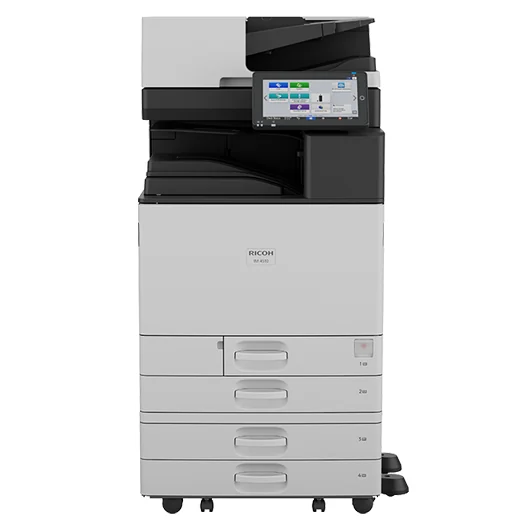
Ricoh’s 2026 IM 4510 is a 45 ppm black-and-white copier that prints on 12 × 18 paper from Tray 2 or the bypass tray. Its 220-sheet feeder is rated for up to 300 images per minute in two-sided scanning.
Price an installed configuration
Ask for a price that includes the trays and finishing hardware you need, delivery, setup and local service.
Ricoh IM 4000 vs IM 4510
Both have a 220-sheet single-pass feeder and 1,200 sheets of standard paper input. The IM 4000 is rated at 40 letter ppm and 240 duplex ipm. The IM 4510 is rated at 45 letter ppm and 300 duplex ipm, and Ricoh lists 12 × 18 as a supported size in Tray 2 and bypass.
Ricoh introduced the IM 4510 in its April 2026 monochrome lineup. Price it with the actual tray and finishing setup you need so you can compare the installed cost with a refurbished IM 4000.
Michigan’s public contract lists $193.79 a month with 20,000 monochrome impressions for eligible buyers. Compare that lease with the color IM C4510.
Compare prices, scan speeds and service costsSee the Ricoh IM 4000Use the pre-purchase inspection checklist
Print and scan specifications
- Letter print speed
- Up to 45 ppm black and white
- 12 × 18 paper
- Tray 2, bypass and supported optional drawers
- Paper input
- 1,200 sheets standard, up to 4,850 with options
- Single-pass document feeder
- 220 sheets
- Scan speed
- Up to 150 ipm one-sided or 300 ipm two-sided
- Fax and finishing
- Optional fax, stapling, booklet finishing and folding
What to confirm with the dealer
Put your largest sheet size and heaviest stock on the quote. Ask for a duplex print and finished sample from the specified tray. For scan-heavy work, run a sample to your actual destination and check that the files are readable and complete.
For a lease, request the term, end-of-lease terms and service charges for the same configuration and print volume. Use the copier quote checklist.
Can I send scans from the panel to Paige?
Ask your administrator to register an approved network share as a folder destination. Try a representative two-sided batch at the panel and use Paige Folder Monitor on Windows to send it to a scan job. Check the document boundaries, extracted fields and final destination before rolling out the shortcut.
Compare routes to PaigeRicoh Scan to Folder instructions
Explore Paige from Ademero, the company that operates CopierGuide.
Compare related Ricoh copiers
- Ricoh IM 4000 Check refurbished if you primarily print letter and ledger and can verify coverage on the exact machine.
- Ricoh IM C4510 Price this model if you also need color printing. Check for the C in the model name.
Published reviews and test evidence
Configuration-specific certification
The Canadian report includes the monochrome IM 4510 and IM 6010 with firmware JE-1.00-H and the Collaborative Protection Profile for Hardcopy Devices v1.0e. Check the exact suffix. Ricoh lists its color IM C6010 under separate evaluations.
Canadian evaluation CAN-688-LSS (PDF)